


Why a defined process protects your budget, timeline and adoption
A custom system that goes over budget, ships late or sits unused costs more than money. Staff keep their spreadsheets, branches keep their own workarounds, and the owner pays twice. A clear stage-by-stage process is how you keep that from happening.
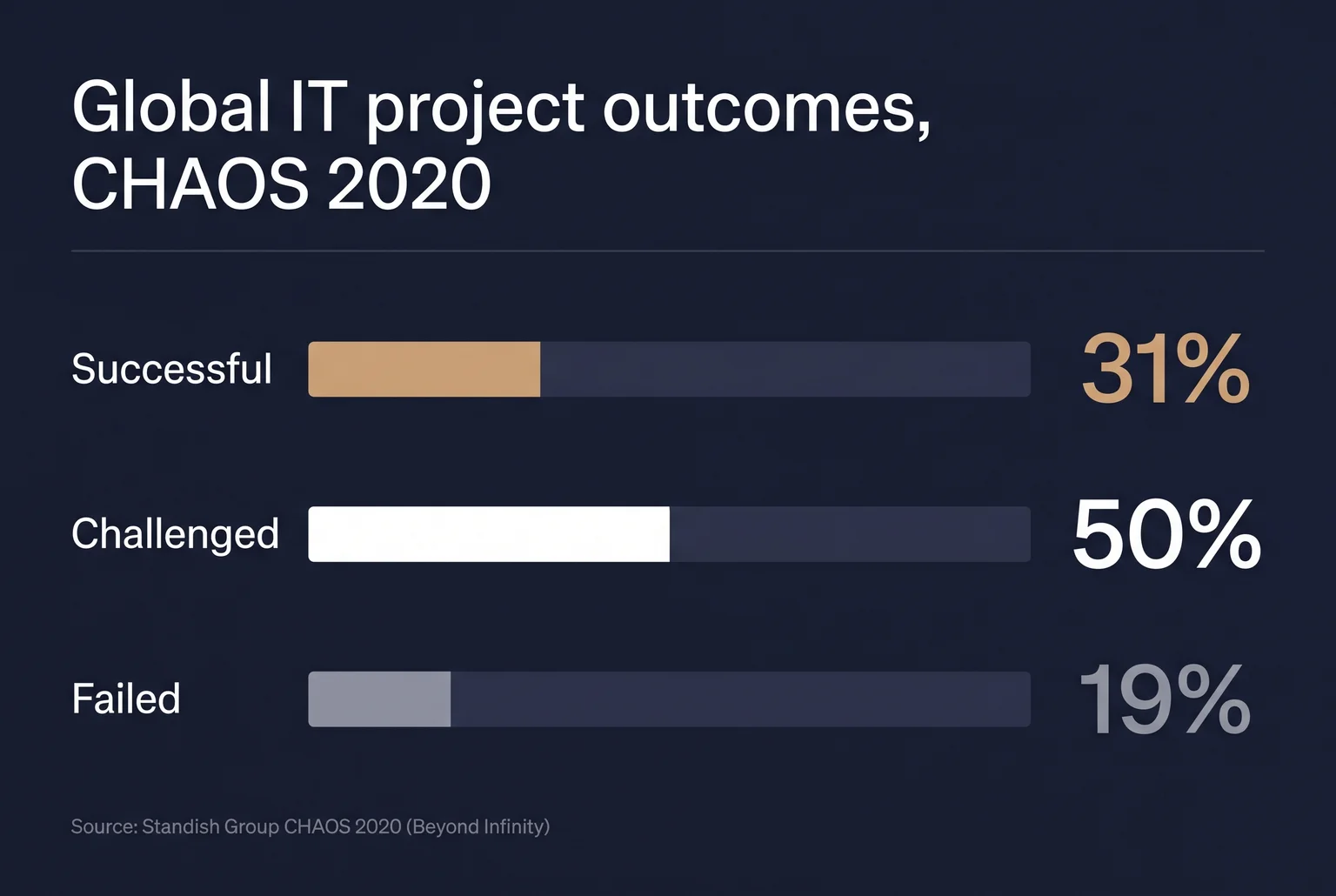
The numbers are sobering. The Standish Group’s CHAOS 2020 report found that 31% of projects were successful, 50% were challenged and 19% failed. Success there means finished on time, on budget and with a satisfactory result. Challenged projects were completed but ran into schedule, budget, scope or outcome problems. Failed projects were cancelled, abandoned or not used after delivery. These figures use newer criteria than the 1994 report (16% successful, 53% challenged, 31% failed), so the two sets should not be compared directly. They also cover IT projects globally, not Philippine businesses specifically, and McKinsey’s research on large IT projects is likewise a picture of risk, not a forecast for your project.
Even so, the pattern is useful. Most trouble comes from unclear goals, shifting scope and software people do not adopt. Each stage of a good process addresses one of these. Discovery and requirements settle what you are building before money is committed. Design and testing put real users in front of the system early. Deployment and maintenance keep it working once the novelty fades.
Custom software makes sense when your workflows, approvals or reporting do not fit a packaged tool, or when you would pay for modules you never use. If a standard HRIS or inventory tool already matches how you work, buying it is usually faster and cheaper.
This guide walks through seven stages:
- Discovery: aligning goals, stakeholders and constraints.
- Requirements gathering: turning goals into a documented, prioritised scope.
- Design: wireframes, prototypes and architecture.
- Development: iterative building with regular demos.
- Testing: QA, user acceptance, security and performance.
- Deployment: go-live, data migration, training and rollout.
- Ongoing maintenance: support, updates and growth.
Discovery: aligning goals, people and constraints before you commit
Discovery comes first because it is the cheapest point at which to find out that a goal is vague, two departments disagree, or an idea will not work as planned. Nothing is built yet. The output is a shared decision on whether to proceed, and on what.
At Quadrant Alpha, we aim to build software that fits a business like a glove, through collaborative partnership. Discovery is where that starts, with questions rather than code.
What happens
- The partner interviews stakeholders and turns their goals into measurable success criteria, such as fewer payroll corrections or faster stock counts.
- Current workflows are mapped, sometimes as user journeys, wireframes or a rough prototype, so everyone sees the same picture.
- A technical feasibility check covers architecture, integrations, data, security and scalability, along with major risks.
- You receive a roadmap with estimates, assumptions and risks, plus a proposed MVP scope.
For multi-site operations, the mapping goes further. Discovery should chart inventory locations, inter-island routes and lead times, stock-transfer workflows, and the systems used by stores, warehouses, couriers and head office. Ninja Van’s article describes a Davao-based company, KJM Cosmetics, dealing with slow inbound processes and unpredictable Mindanao-to-Luzon shipments. A system designed without that picture would be built around the wrong problems.

What to prepare
- Name the problem in one or two sentences and the result you want, with a number if possible.
- Bring HR, operations and finance to the table. HR knows the approval chains, operations knows where stock and delays actually occur, and finance knows the budget limits and reporting needs.
- Gather existing spreadsheets, forms, reports and the names of tools the new system must connect to.
- List constraints: branch connectivity, staff devices, personal data you handle, and who has the authority to approve scope and changes.
- Decide who speaks for the business when stakeholders disagree.
A good discovery can also end in a smaller scope, a packaged tool, or a decision not to build.
Turning goals into a signed-off, prioritised scope
Requirements gathering converts the goals set in discovery into a written scope that both sides can point to. When a budget dispute starts later, this document is what settles it.
Requirements are usually written as user stories. A user story briefly describes a business need from the user’s perspective and is not a full specification, so acceptance criteria add the observable conditions that show the feature works. For example: “As an HR officer, I approve a leave request so that payroll reflects it.” The criteria might say the approval updates the employee’s leave balance the same day.
Philippine rules enter here as requirements. Take a sales system. The EOPT Act took effect on January 22, 2024, and the invoicing provisions of RR No. 7-2024 took effect on April 27, 2024. Non-VAT-registered sellers must issue a non-VAT invoice for sales of ₱500 or more, or on the buyer’s request at any amount. The requirements should therefore cover invoice types, mandatory fields, VAT computation, numbering, buyer-requested invoices, POS integration and audit reports. Payroll has its own list. SSS contributions are generally remitted by the last day of the following month, with penalties for late payment, and PhilHealth payment windows depend on the last digit of the employer’s PEN. Pag-IBIG and BIR withholding rules belong on the list too. Treat these as prompts for your accountant or counsel to check against current rules, not as legal advice.
Scope is then ranked with MoSCoW: Must have, Should have, Could have, and Won’t have this time. A payroll build such as QWORK might place statutory computation under Must, a loan-request approval flow under Should, and a training tracker under Could. Pushing an item into Won’t have is what keeps the first release on budget.
What you should receive
- A requirements document with user stories and acceptance criteria
- A prioritised backlog marked Must, Should, Could or Won’t
- A list of statutory and compliance requirements, each with a named owner
- Agreed integrations and reports
The business signs off on this package before design begins. After that, new requests go through a change process with a stated cost and timeline, which is how scope creep gets priced instead of absorbed.
Wireframes, prototypes and an architecture plan before any code
Design turns the signed-off scope into something you can look at and test before developers build it. The cheapest time to find a misunderstanding is while it is still a drawing.
A wireframe is a plain sketch of each screen showing what goes where, with no colours or branding. A prototype links those screens into a clickable mock-up, so an HR officer can try approving a leave request and see where she gets stuck. Prototypes can surface misunderstandings, interface problems, omitted functions and contradictions in requirements. They are less useful when the task is already well understood, so a good partner prototypes the risky workflows, such as payroll approvals or invoice entry, and skips the rest.

The architecture plan describes how the system is organised behind the screens: where data is stored, how modules talk to each other, how it connects to your POS or accounting tools, and who can see what. Ask whether it is cloud or on-premise, how branches will share one database, and how Data Privacy Act obligations affect access rights.
Test with the people who will use the system. In 2024, 98.8% of Filipino internet users aged 10 and above connected through a cellphone, and access varies by region, with subscription cost the most common barrier for households without home internet. A warehouse checker in a provincial branch may use a phone on a weak signal, so important screens should be tried that way. Real feedback at this stage is how a misunderstanding gets caught before it spreads into code. Claims that late fixes always cost 100 times more are unreliable. Boehm and Basili note the ratio for small, non-critical systems may be closer to 5:1, though fixes after delivery are often far more expensive.
What you should review and approve
- Wireframes and prototype for the Must-have workflows, tried by actual staff
- The architecture plan, including hosting, integrations and access roles
- Phone and low-bandwidth behaviour for field and branch tasks
- A written list of design changes agreed during review
How the build runs: short cycles, regular demos, one decision-maker
Developers build the system in short cycles instead of one long stretch. In Scrum, the most common method, each cycle is called a Sprint, a fixed length of one month or less. Two weeks is a practical length for most Philippine businesses. It is short enough to check each feature against how your branches actually work, and long enough to finish something real.
The work comes from a product backlog, an ordered list of what the system still needs. It is the single source of work for the team, so a request that is not on the list is not being built.
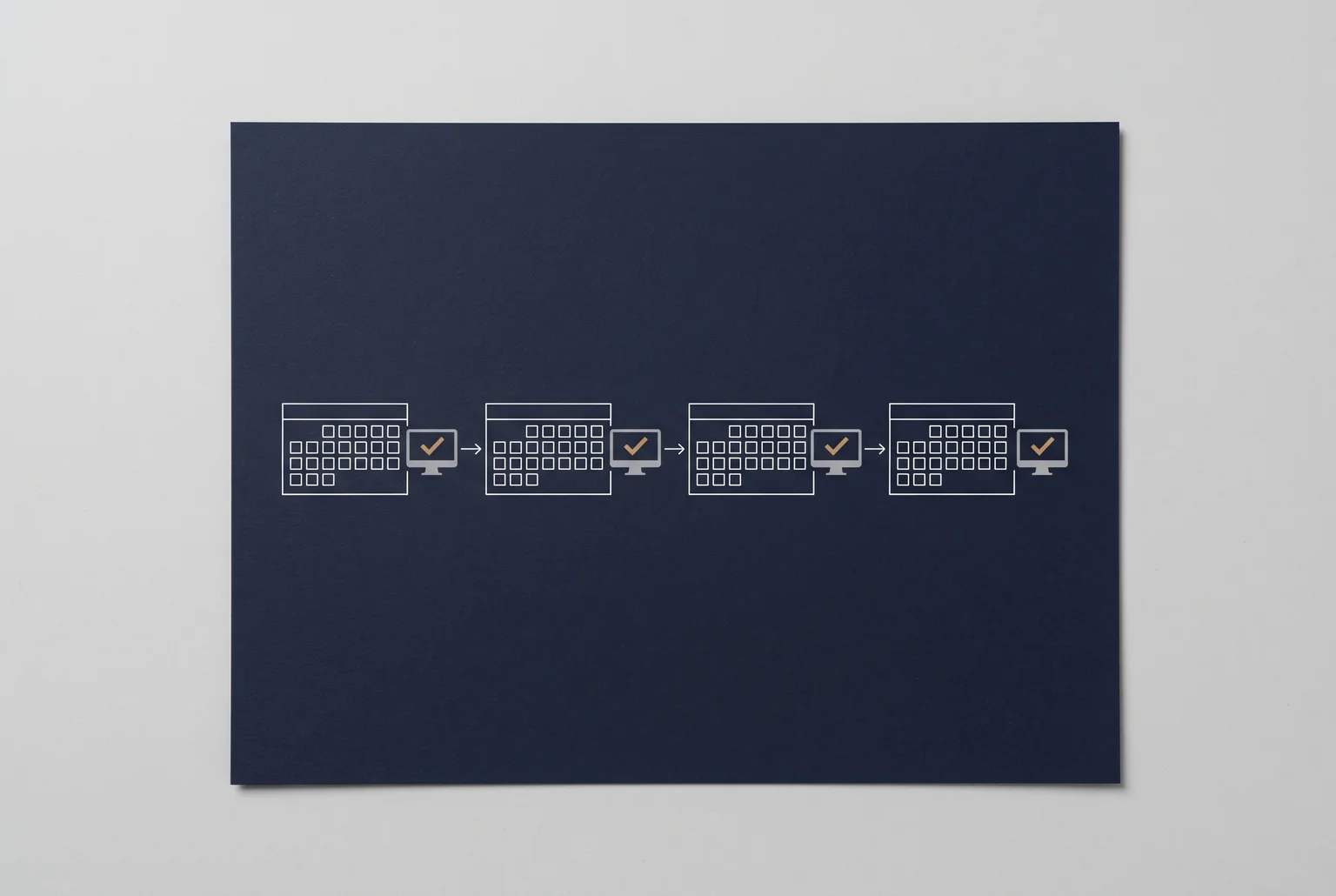
Each cycle ends with a demo. The team shows a working piece of the system that is usable and checked against an agreed definition of done. Your staff click through it and say what is wrong. The backlog is then reordered based on what the demo showed.
Milestones group several cycles into points you can sign off, such as “leave and overtime approvals working” or “purchase orders linked to stock.” Each one is a review of what exists, not a status report.
Change requests keep new ideas from slipping in. Anything outside the signed scope goes on the backlog with a written note on its effect on time and cost, and you decide whether it replaces something or waits.
Name one point of contact on your side, with authority to decide. When HR, finance and operations each send separate instructions, developers build to whichever arrived last. Shared backlogs, written decisions and prompt feedback also reduce confusion when the team works remotely.
One of our clients, a leather-repair specialist, said we automated manual processes, improved turnaround and gave staff a system they could use during expansion.
Testing before go-live: QA, UAT, security and performance checks
Testing runs in layers, and your staff own one of them.
QA is the developers’ own check. Testers run each feature against the requirements, try wrong inputs, and confirm that a leave request reaches the right approver and that stock counts update after a purchase order.
Security testing is a methodical evaluation of whether application security controls work. It should run across the whole life cycle, not only as a penetration test at the end. Under the Data Privacy Act, you must keep reasonable and appropriate safeguards for personal data, and outsourcing development does not hand that duty to the vendor. Ask how breaches are detected and contained. A qualifying breach must be reported to the NPC and affected individuals within 72 hours.
Performance testing checks the system under load, such as payroll day or a month-end stock count across all branches.
User acceptance testing (UAT) is where your people confirm the system fits real work. Use this checklist:
- Pick testers from each role, including branch staff, not only managers.
- Use realistic data, anonymised where it holds employee or customer records.
- Write acceptance criteria before testing begins.
- Run full workflows, such as request to approval to payroll, and test every integration.
- Record each defect and retest after fixes.
- Give formal written sign-off before release.
Testing is how outcomes get confirmed. One of our clients, a major Philippine logistics provider, reports achieving 98% inventory accuracy with our Inventory, Purchasing and Sales System. This customer-reported result reflects that organisation’s experience; outcomes vary by implementation. The same client said, “Users are in the process of familiarization, especially in Inventory, but so far the Sales process has also been satisfactory.” Accuracy gains depend on users being trained and checked against real stock, which is what UAT is for.
Going live: migration, training and rollout planning
A deployment plan should state how the system reaches users, and it should reflect your business objectives, risk appetite, budget and resources. Hosting is part of that choice. Cloud hosting reduces the servers you buy and maintain, but you should check connectivity, data residency, service levels and backup ownership. On-premises gives direct control and needs hardware, security and IT skills. Hybrid suits legacy systems but adds integration and troubleshooting work.
For multiple branches with uneven connectivity or different practices, a phased rollout usually fits better than a single cutover. Start with a pilot group of representative users, then expand in waves while you watch performance. Big-bang suits a single site with a simple process.
Training should be role-specific, with help desk or floor support in the first days. Cashiers, warehouse clerks and branch supervisors need different walkthroughs than HR officers.
Launch-readiness checklist:
- Legacy data cleaned, migrated, and reconciled against source records.
- UAT sign-off on file.
- Staff trained by role, including non-technical users.
- Named support contacts for each branch.
- A fallback plan: keep the old system or manual process available, with agreed criteria for rolling back.

Our stories page includes a client testimonial under the heading “30% Faster HR Processing,” from a premier Philippine manufacturer using our QWORK HRIS. Another client, a leading leather-repair specialist, describes the system as easy for staff to use and says that helped its expansion. Results like these are client-reported and depend on adoption, so your own outcomes will differ.
Support after launch: fixes, updates and growth
Launch starts a maintenance period that lasts as long as the system runs. ISO/IEC/IEEE 14764:2022 names five types of maintenance: corrective, preventive, adaptive, additive and perfective. In practice, you will mostly see four. Corrective work fixes faults found after go-live. Preventive work catches latent faults, such as unpatched components, before they cause an outage. Adaptive work keeps the system usable when its environment changes. Perfective work improves speed, documentation or features as your staff ask for them.
Regulation drives much of the adaptive work in the Philippines. When agencies revise rates or salary ceilings, payroll and HR software may need new SSS contribution tables, PhilHealth employer and employee shares, and updated statutory reports. Pag-IBIG rules and regional minimum-wage orders can change payroll inputs too. Someone has to own those updates, and it should be agreed before launch.

Growth adds load. A new branch, more users or a second warehouse can slow a system that ran well at launch.
Questions to ask a partner about support:
- Who fixes a fault on a weekday, and who responds after hours?
- Who updates payroll tables when rates change, and how fast?
- How are security patches applied and reported to you?
- Who holds the source code, backups and documentation?
- How are new feature requests scoped and priced?
When a development partner makes sense
A partner is worth considering when one or more of these describe your business:
- Your workflows are complex, and off-the-shelf software forces workarounds.
- Operations are scaling across branches, warehouses or channels.
- Your in-house IT team is small or absent.
- You need integrations or reports that packaged tools do not offer.
At Quadrant Alpha, we build custom software for requirements that off-the-shelf products do not meet. Our six-phase implementation runs from contract, NDA and DPA through data migration, training, go-live and post-launch audit.
Explore Custom Software Development at quadrantalpha.com/solutions or request a conversation about your project.